Today, with just a few clicks, anyone can see the front of your house, which brings real privacy worries. Many individuals feel unsettled upon discovering their houses and vehicles are clearly visible on Google Maps Street View. This leads to a central question: can this imagery be removed, and how?
The solution is a specific, permanent process managed directly by Google.
Who Is This For and What Does It Mean?
Homeowners have various reasons for seeking this option.
- It is commonly used by people concerned about personal security, victims of stalking, or those who simply value their privacy.
- The process also applies to individuals with a clearly identifiable car or license plate.
- The goal is not to hide a location’s address, but to control the visibility of one’s private space on a public digital platform.
Step-by-Step Removal Process
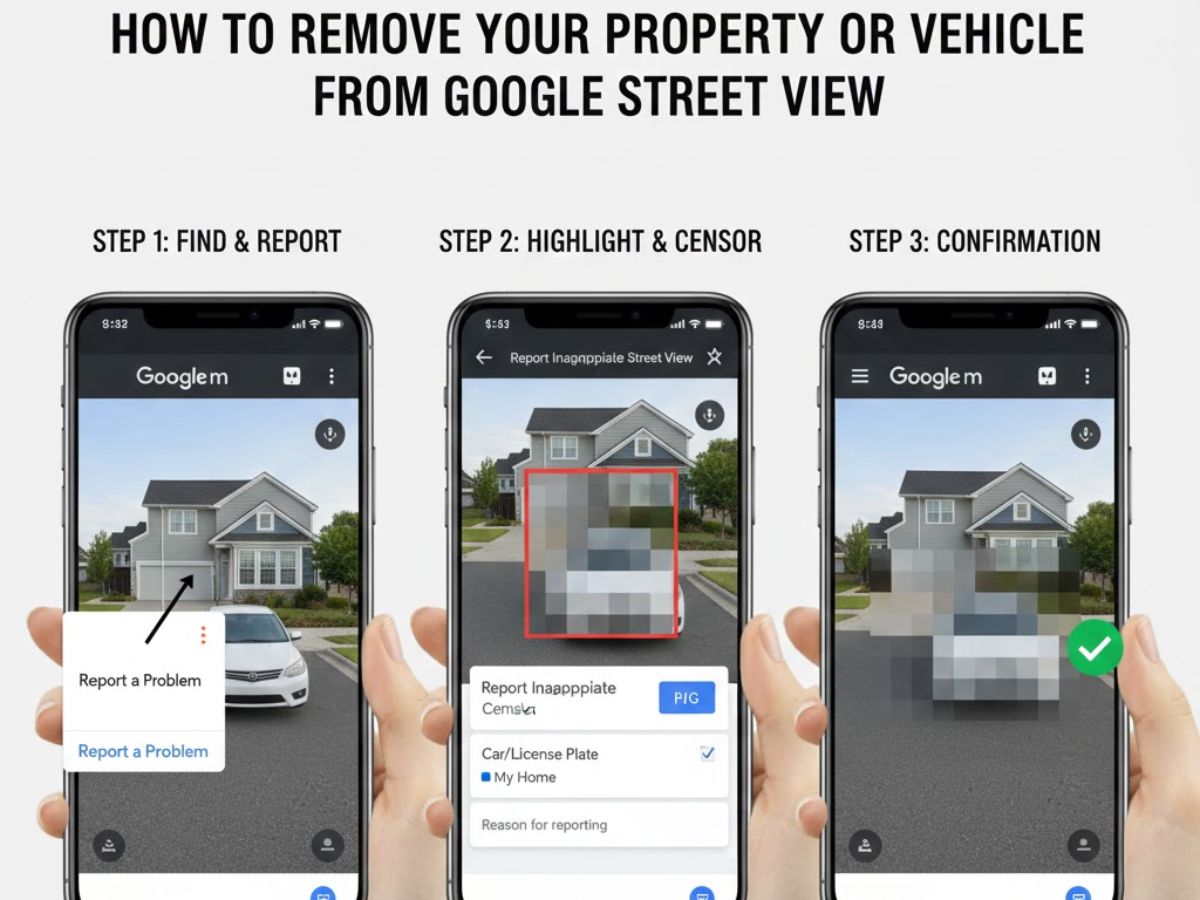
The entire procedure is handled through Google’s “Report a Problem” feature, which is the only official channel.
- You start by navigating to your property on Google Maps and switching to Street View mode.
- When the image opens, look for the “Report a problem” button in the bottom right corner.After clicking, the system provides a form and a set of crosshairs to precisely select the area to blur (e.g., a window, door, or license plate).
- Google offers specific options like “My home” or “My car” to clarify the request’s nature.
- You must then provide your email address and a clear reason for the blurring request to complete the submission.
Once your place is blurred, it’s permanent and can’t be reversed. It’s an important choice, so make sure you’re fully sure before you go ahead. The blur will show forever for anyone who checks that spot checks each request by hand, so it might take a while. They may reach out to confirm it’s really you. This process doesn’t affect the home address saved in your Google Account.
Also Read: Strengthening Strategic Bond: India and Italy Forge New Front Against Terrorism Financing