The Election Commission of India (ECI) has launched the online forms for the Special Intensive Revision (SIR) process in West Bengal. After a brief delay caused by technical issues, voters can now easily access and fill up their enumeration forms online. The move aims to make the voter list update process smoother and more accessible for all, especially for those living outside the state.
Where to Access the Online Enumeration Forms
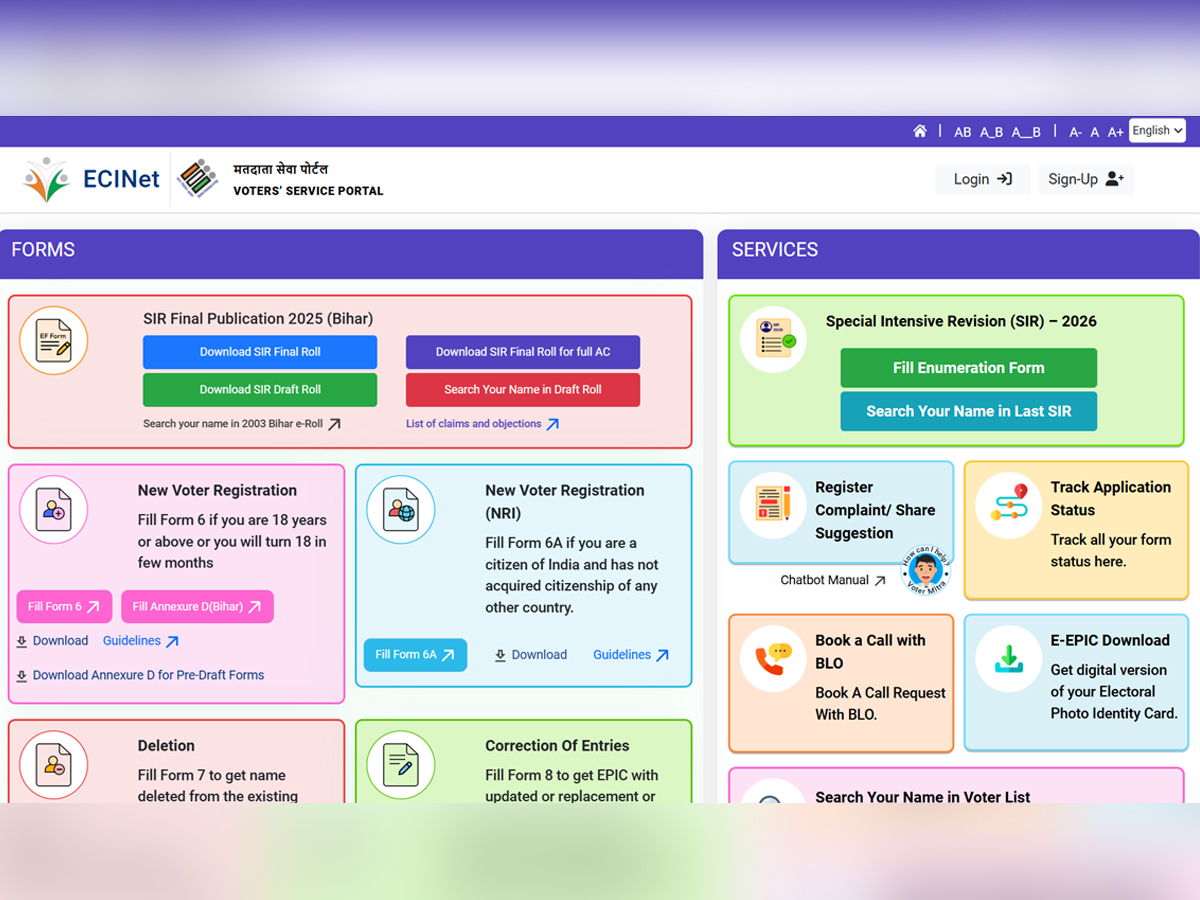
The online SIR forms are now available on the official voter portal of the Election Commission of India. Click Here For The Direct Link
To access them, visit the ECI website or directly use the ECINET mobile app, which has been updated to support the new online submission feature.
Officials said the system has been designed to make the process more transparent and user-friendly.
How to Fill the Online SIR Form: Step-by-Step Guide
- Visit the ECI’s official voter portal.
- Click on the option ‘Fill Enumeration Form’ on the homepage.
- A new page will open asking for your login details — registered mobile number, email ID, or EPIC number.
- Enter the captcha code and submit. You will receive an OTP on your registered mobile number.
- Once verified, you will be redirected to a list of states. Select West Bengal from the dropdown.
- Enter your EPIC number as per your voter ID card.
- The system will automatically generate your voter details — including name, serial number, and other information.
- Verify that all details are correct and that your name matches exactly as per your Aadhaar card.
If Your Details Do Not Match
If you find any mismatch between your voter ID and Aadhaar details, do not worry.
The name and contact number of your Booth Level Officer (BLO) will be provided on the portal. You can directly reach out to your BLO for assistance or corrections.
The Election Commission has urged voters to cross-check every detail carefully to avoid errors in the final electoral roll.
Unable to Access the SIR Form Online? Here’s What to Do
If you cannot fill the form online due to technical or connectivity issues, you can wait for your BLO to visit and complete the form offline.
Alternatively, you can find your BLO’s contact details on the ECI website and even book an appointment online.
To book a call, go to the ECI portal, click on ‘Book a Call with BLO’, and enter your EPIC number and captcha code to schedule a convenient time.
Important Dates for SIR Process in West Bengal
- House-to-house enumeration: November 4 – December 4, 2025
- Draft electoral roll publication: December 9, 2025
- Claims and objections period: December 9, 2025 – January 8, 2026
- Final electoral roll publication: February 7, 2026
The ECI has emphasized that every eligible voter should verify their details during the SIR period to ensure accuracy in the upcoming electoral rolls. The online facility aims to make voter registration and correction simpler, faster, and more transparent than ever before.